Minecraft Web Manager
English | 中文
An MCDReforged plugin that provides a login-protected web management panel for Minecraft servers: live console, player management, online plugin and mod management, online editing for server.properties and MCDR's config.yml, mod configuration editing, and resource usage charts.
The panel is hosted by the plugin itself. No separate web server, CDN, or frontend build tool is required.
- Version: 1.2.6
- Dependencies: MCDReforged
>=2.15.0, Python 3.10+ - Python packages:
fastapi,uvicorn[standard],python-multipart,psutil,ruamel-yaml
Features
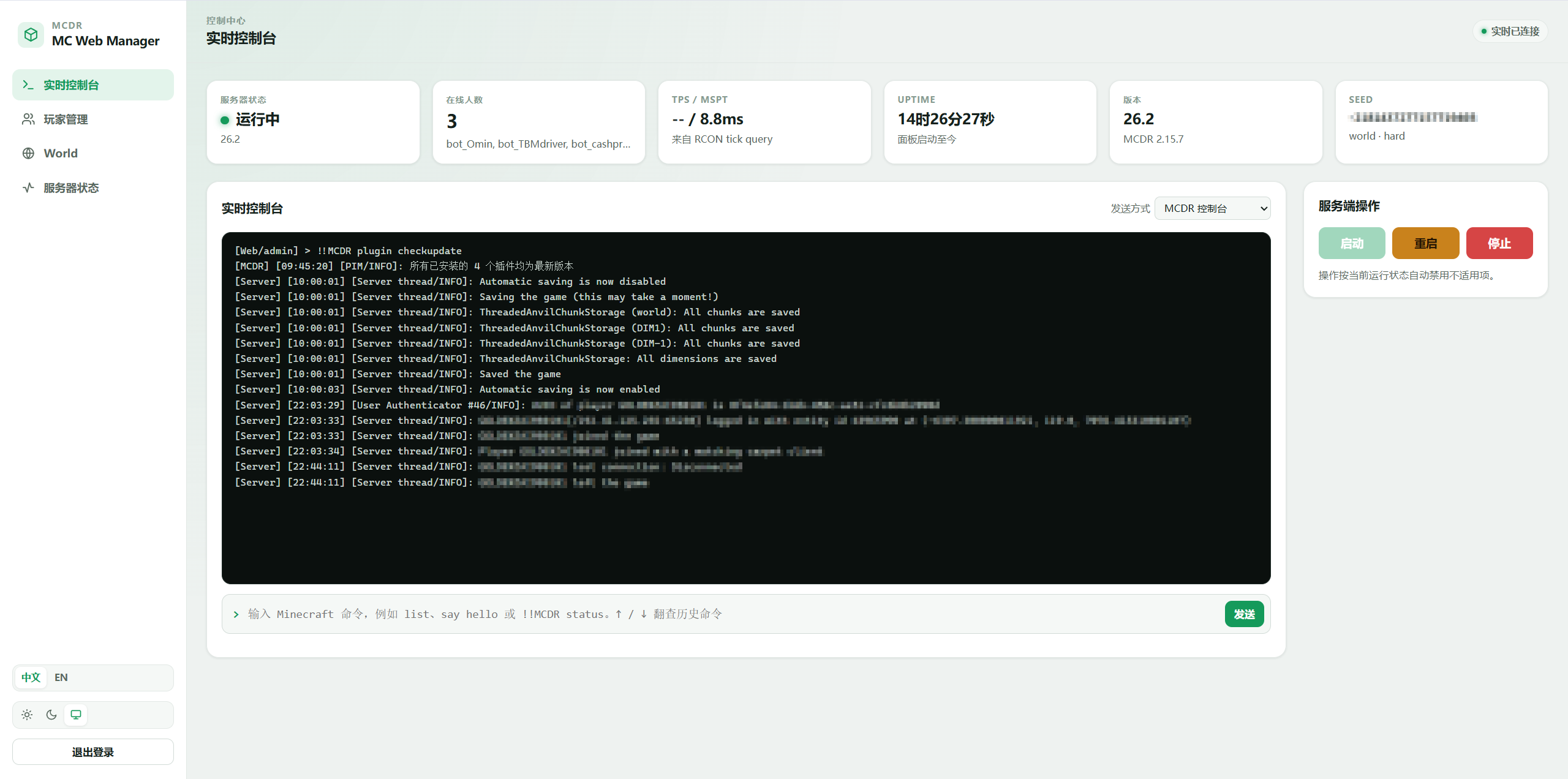
Live console
- Streams the latest 1,000 lines of server log output in real time
- Supports Minecraft commands and MCDR commands (starting with
!!) - Switches between console (writes to the server's standard input) and RCON (returns the server's reply text)
- The input field supports
↑/↓command history browsing and command suggestions - One-click server start / stop / restart
Player management
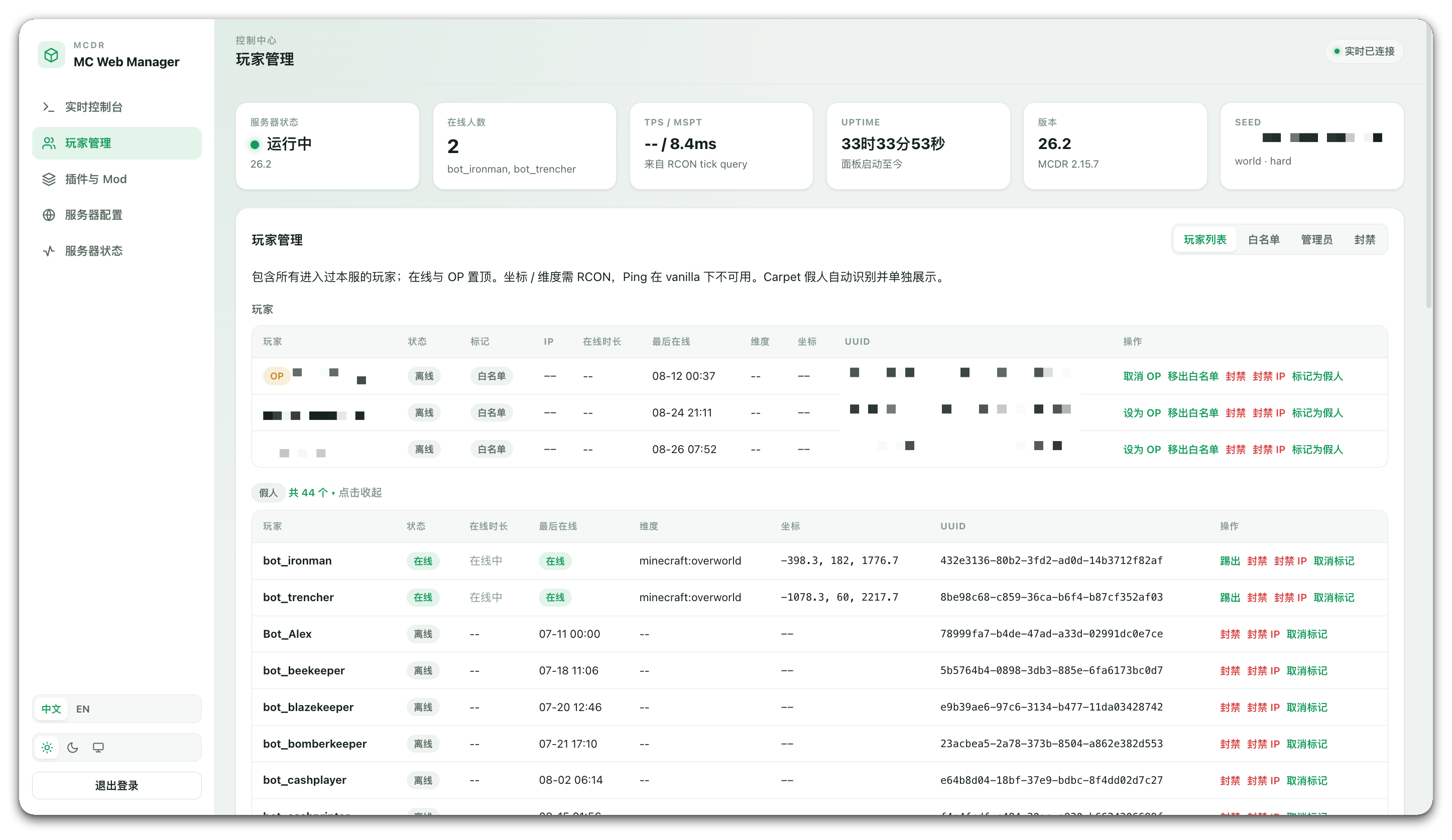
- Player list: aggregates every player who has joined the server, showing online state, IP, session duration, last seen time, dimension, and position; click a player name to copy its UUID
- Bot list: detected Carpet fake players (bots) are shown in a collapsible list and can be manually marked or unmarked inline; bot names can also be clicked to copy their UUIDs
- Per-player actions: grant / revoke OP, kick, ban, ban IP, add to / remove from the whitelist
- Whitelist: toggle the whitelist, reload it, and add or remove members
- Operators: view and add or remove OPs
- Bans: ban or pardon players and IPs, with an optional reason
Plugin and mod management
Plugins
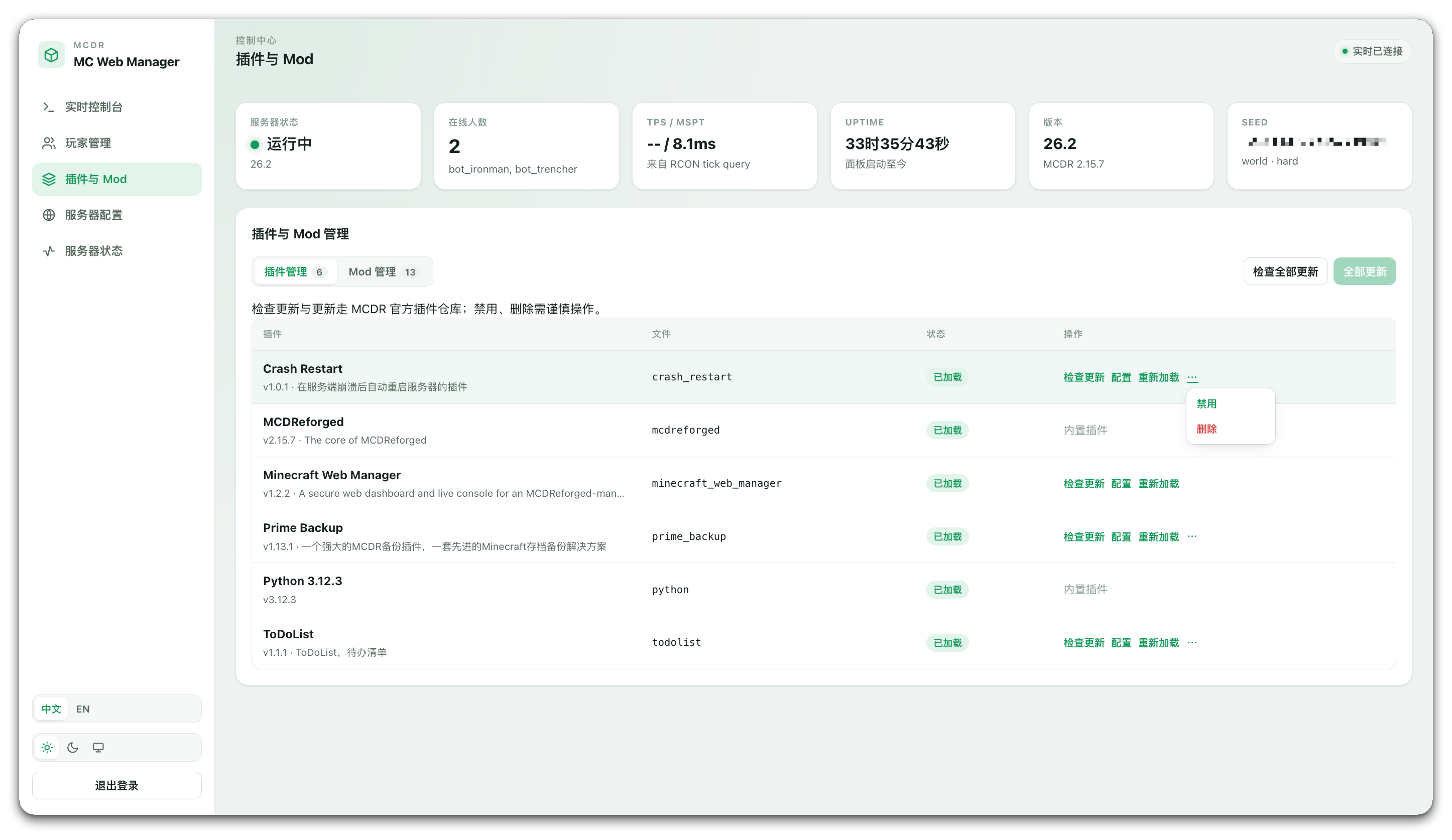
- Plugin list: shows all MCDR plugins installed on the server; supports checking for updates, disabling, deleting, enabling, and reloading plugins
- Plugin configuration: edit plugin configuration files online; binary files and files larger than 1 MiB are read-only
- Related buttons are disabled while a plugin operation is running to prevent duplicate actions. A rejected update check (for example, because another install task is already running) is not incorrectly reported as “all plugins are up to date”
Mods
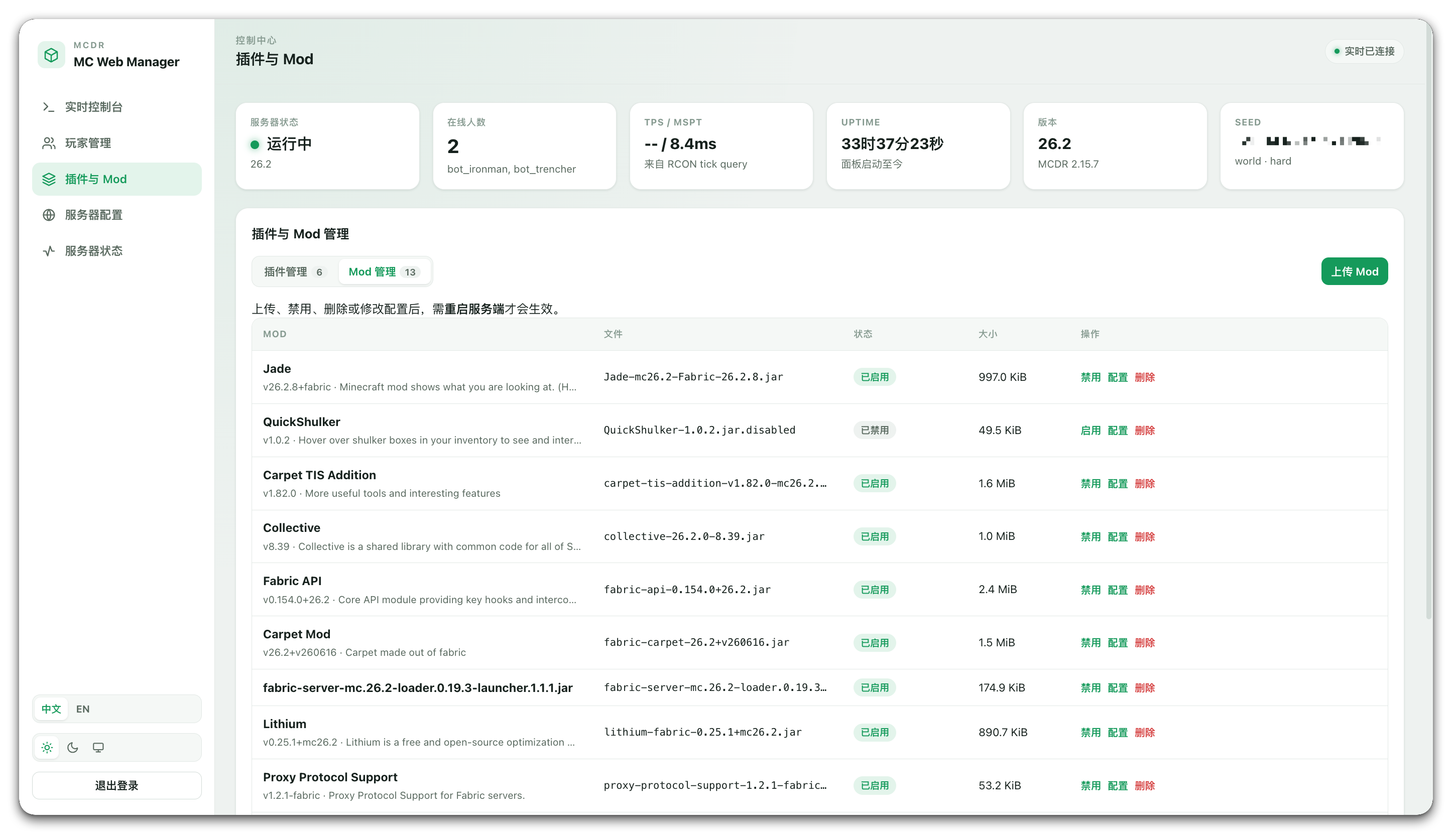
- Mod files: shows all mods on the server and supports uploading, disabling, deleting, and configuring each mod. Upload, disable, and delete operations require a server restart to take effect
- Configuration files: edit mod configuration files online; binary files and files larger than 1 MiB are read-only
Server configuration
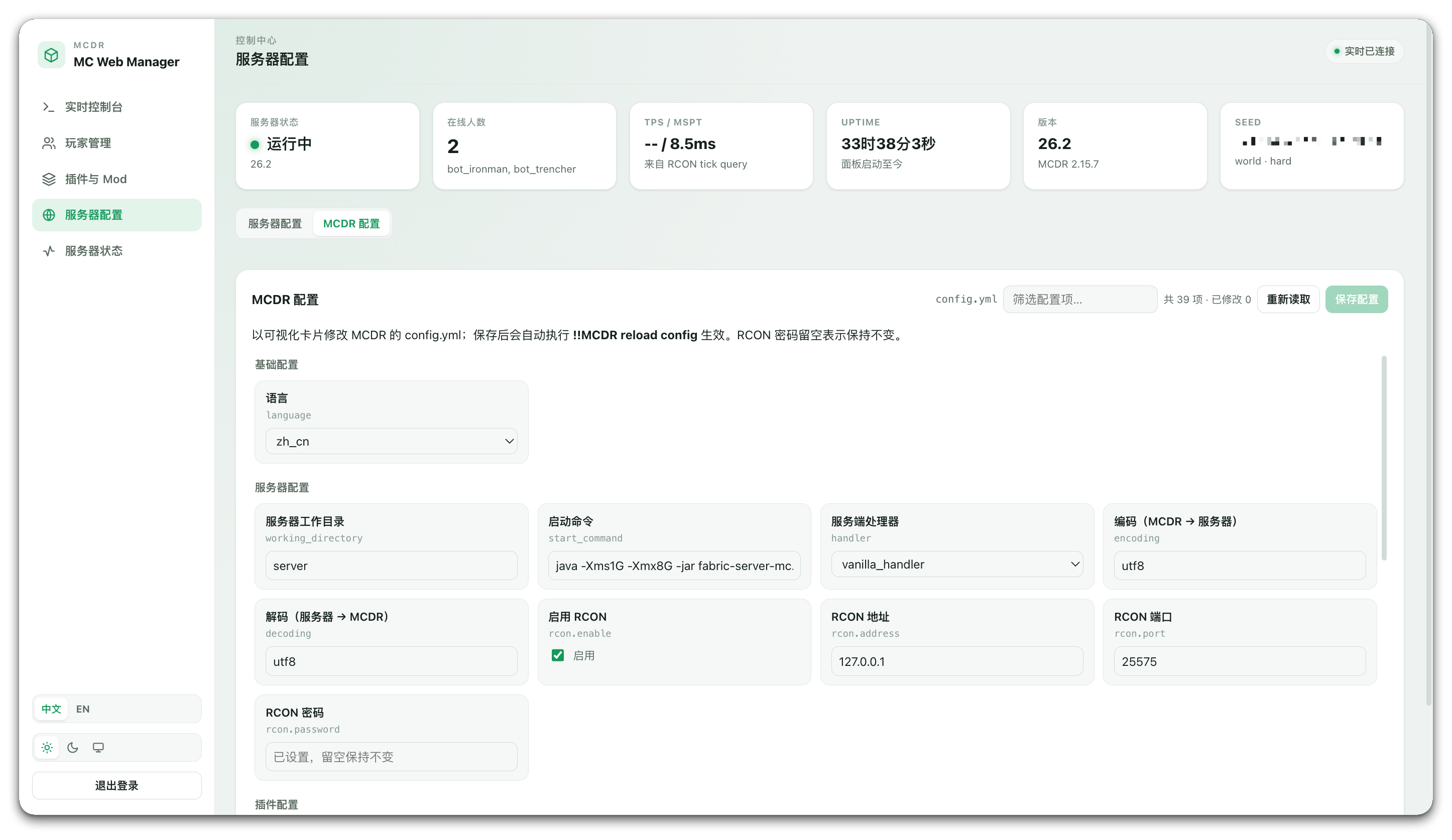
The top of the server configuration page switches between the Server configuration and MCDR configuration sub-tabs. Both sub-tabs share the same heading, toolbar, and right-aligned action area, while filter fields adapt to the available width.
- Server configuration: view and edit
server.propertiesonline; changes take effect after the server is restarted - MCDR configuration: view and edit MCDR's
config.ymlonline; saving automatically runs!!MCDR reload configso changes take effect immediately
Server status
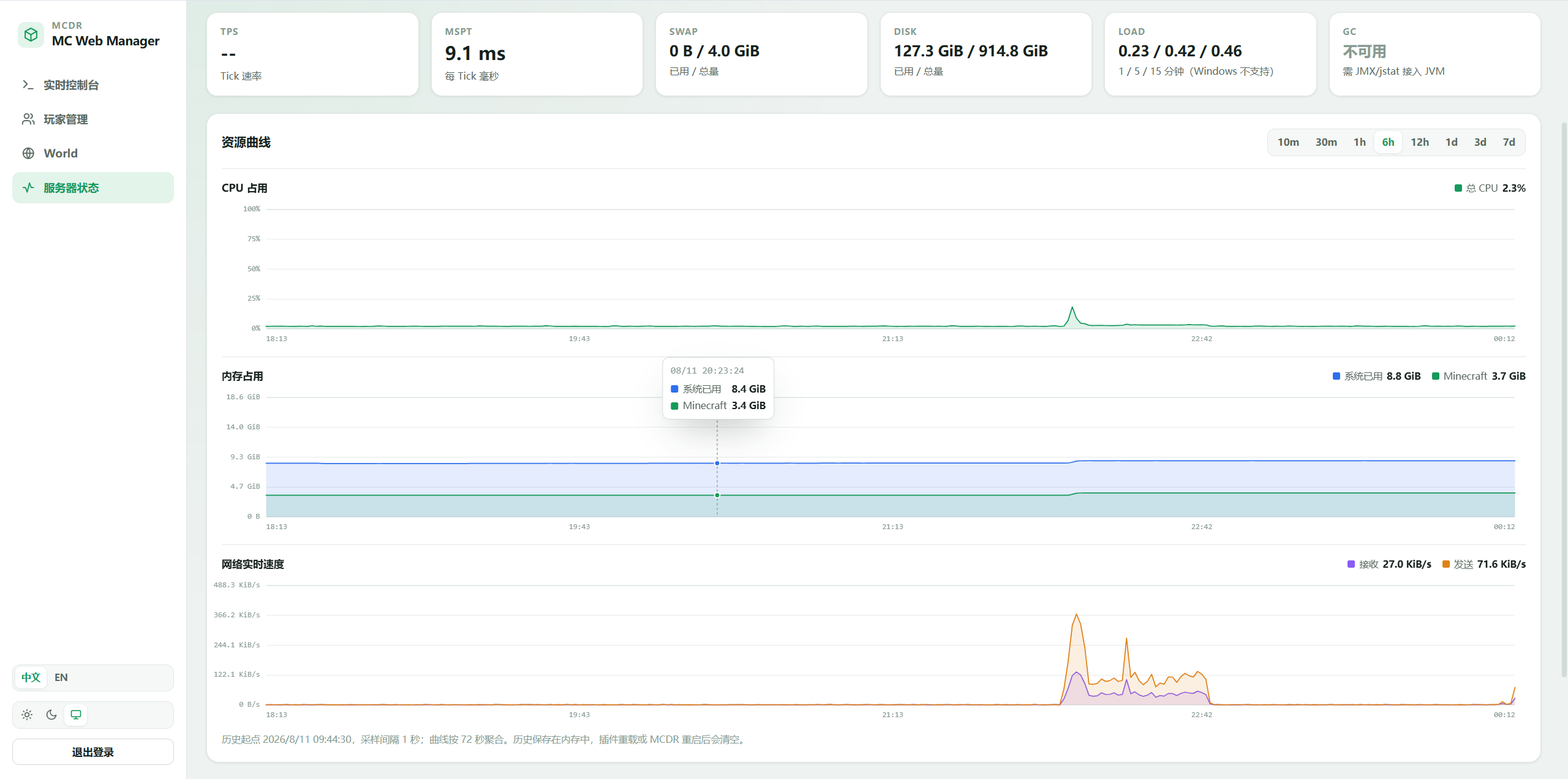
- Overview of TPS, MSPT, swap, disk, and system load
- Line charts for CPU usage, memory usage, and live network speed, with ranges of 10m / 30m / 1h / 6h / 12h / 1d / 3d / 7d
- Separate curves for the whole host and the Minecraft process; 1-second samples are retained for the latest hour, and 1-minute averages for the latest seven days
Other
- Light, dark, and follow-system themes, remembered automatically
- The interface language follows the browser automatically (Simplified / Traditional Chinese → Chinese, anything else → English); it can also be switched and remembered manually from the top-right corner / sidebar
- Responsive layout suitable for mobile browsers
Installation
1. One-command installation
!!MCDR plugin install minecraft_web_manager
2. Plugin management
See the official MCDReforged documentation.
3. Get the initial password
On first load, the plugin generates a one-time password and prints it to the MCDR log at WARNING level:
[Minecraft Web Manager] Minecraft Web Manager bootstrap password: xxxxxxxxxxxxxxxxxxxxxxxx
Save this password immediately — it appears in plain text only once. Then open the following address in a browser:
http://127.0.0.1:8088
The default username is admin; the password is the string shown above.
4. Forgot the password?
Set both password.salt and password.hash in the configuration file to empty strings:
"password": { "salt": "", "hash": "" }
Save the file and run !!MCDR reload plugin minecraft_web_manager. A new one-time password will be printed to the MCDR log.
How to update
Method 1: MCDR command
!!MCDR plugin install -U minecraft_web_manager
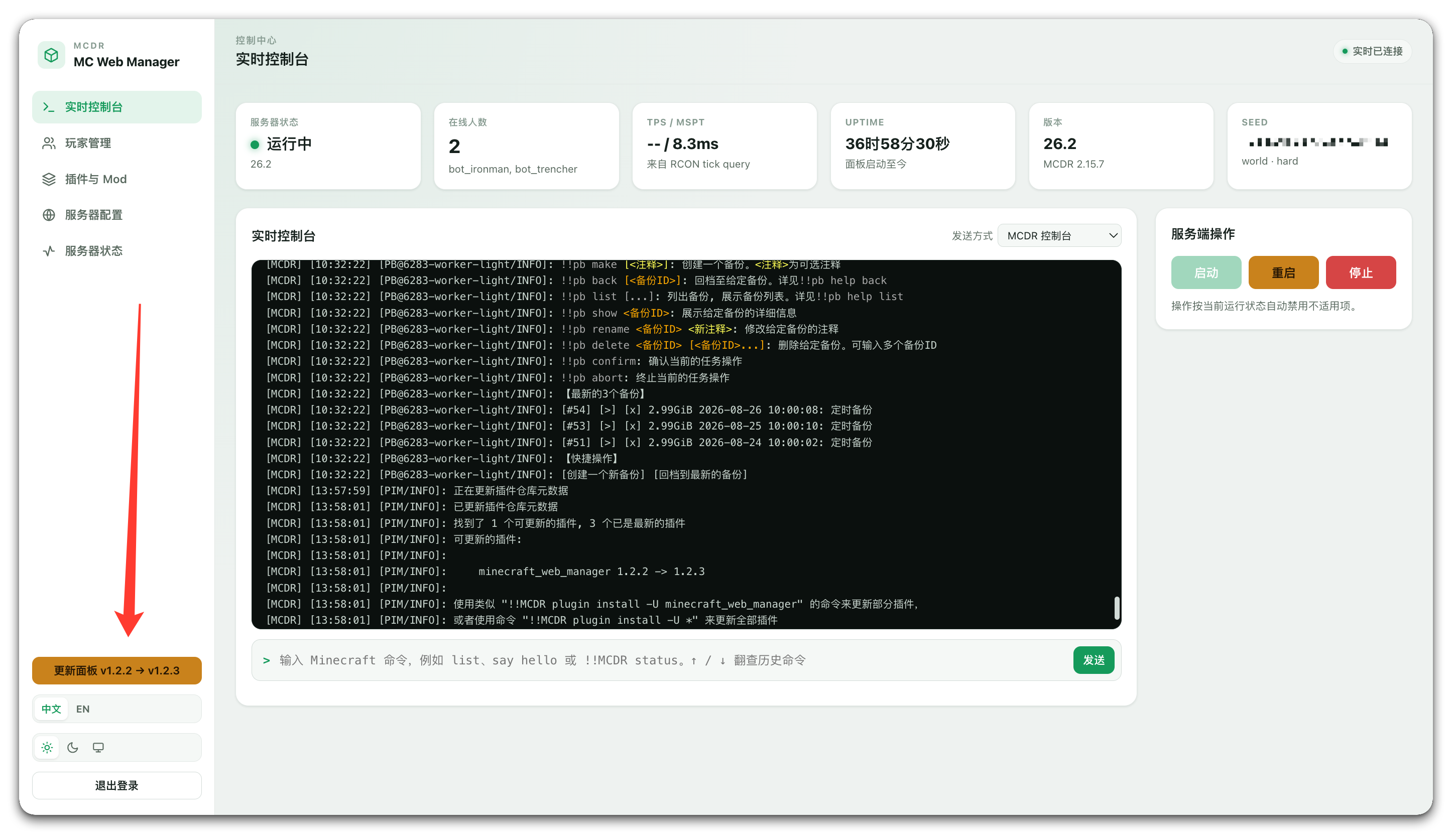
Method 2: Panel update prompt
Click the prompt and confirm. The latest plugin version and its related dependencies will be downloaded automatically, and the plugin will reload automatically.
Configuration
The configuration file is located at config/minecraft_web_manager/config.json in MCDR's working directory. Reload the plugin after changing it for the changes to take effect.
| Key | Default | Description |
|---|---|---|
host | 127.0.0.1 | Panel listen address. Local-only by default; set it to 0.0.0.0 to access the panel from other machines |
port | 8088 | Panel listen port |
username | admin | Login username |
password.salt / password.hash | generated automatically | PBKDF2 salt and password hash; the password itself is never stored |
token_secret | generated automatically | Signing key for login tokens; clearing it immediately invalidates all logged-in sessions |
token_ttl_seconds | 2592000 (30 days) | Login session lifetime in seconds; active sessions are automatically renewed before expiry |
panel_title | MC Web Manager | Panel brand title shown in the sidebar and browser tab; the login page title follows it |
bot_names | [] | Player names manually marked as bots (lowercase); manual fallback for automatic detection |
not_bot_names | [] | Reverse list (lowercase): forces a player to be treated as real even if the name rule or offline UUID matches; the inline “unmark” action writes here |
bot_name_patterns | ["(?i)^bot[_-]"] | Regex list for bot names; by default applies only to players not present in usercache, avoiding false positives for real players with similar names |
bot_name_patterns_apply_to_all | false | Set to true to apply name rules to every player (for servers where fake players are also written to usercache); add real players with matching names to not_bot_names |
About RCON
Most features do not require RCON, but the following do:
- TPS / MSPT readings (through
tick query) - Coordinates and dimension in the player list
- Command reply text when the console is switched to the RCON channel
- Recovering the online-player list after a plugin reload
RCON must be configured on both sides, with matching port and password:
- Minecraft side:
enable-rcon,rcon.port, andrcon.passwordinserver/server.properties - MCDR side: the
rconsection in MCDR'sconfig.yml
The three Minecraft-side settings can be edited directly from the Server configuration sub-tab on the panel's Server configuration page; the server must be restarted afterwards. The MCDR-side settings can be edited from the MCDR configuration sub-tab on the same page; saving automatically runs !!MCDR reload config.
Security recommendations
The panel has full control over the server (executing arbitrary commands, banning players, changing configuration, managing / deleting plugins and mods, and editing configuration files), so expose it carefully:
-
It listens on
127.0.0.1by default. When remote access is needed, keeping this setting and using an SSH tunnel is recommended -
If it must be exposed to the public internet, put it behind a reverse proxy such as Nginx or Caddy and enable HTTPS. The plugin does not provide TLS; with plain HTTP, passwords and tokens are exposed in transit
-
The login endpoint has simple failure throttling (at most 10 attempts per source within 60 seconds), and the panel's API documentation is disabled by default. Session cookies use
HttpOnlyandSameSite=Strict, so page scripts cannot read the token -
A reverse proxy must forward WebSocket connections, otherwise the live console cannot connect:
location /ws/ { proxy_pass http://127.0.0.1:8088; proxy_http_version 1.1; proxy_set_header Upgrade $http_upgrade; proxy_set_header Connection "upgrade"; } -
Sensitive settings such as
rcon.passwordare shown as blank in the panel and are never sent to the browser; submitting an empty value leaves the original value unchanged -
The MCDR configuration editor displays fields individually and never echoes the RCON password; submitting an empty value leaves the original value unchanged
Known limitations
- Resource usage history is kept in memory, so it is cleared when MCDR restarts or the plugin reloads and then starts accumulating again
- World seed, name, and difficulty are read from save files, which are updated only when the server saves; values may lag behind the actual state by several minutes
- Player IPs and UUIDs are obtained by parsing server output. Unusual server log formats may prevent capture; players recovered after a plugin reload have no join time or IP
- The mod list only identifies Fabric mods by reading
fabric.mod.json; Forge / NeoForge mods are listed by filename only. Upload, disable, and delete operations manage.jarfiles without distinguishing loaders - MCDR configuration is edited as visual fields and rewritten by ruamel.yaml on save; the set of configuration fields is detected from the MCDR version, and unknown fields added by newer versions are shown with generic inputs
- Plugin update checks and updates require network access to the MCDR plugin catalogue, and only packed plugins (
.mcdr/.pyz) can be updated. Detailed check and update output appears in the live console. The panel checks itself each time it opens; when an update is available, it can be confirmed from the sidebar footer to run!!MCDR plugin install -U minecraft_web_managerand reload automatically. The panel itself can also be reloaded from the panel, briefly going offline and recovering automatically - Bot detection: classic Carpet bots are identified precisely by offline UUID. TIS/AMS/RMS-style extensions may use Mojang-resolved or random v4 UUIDs for bots, so detection can only rely on name rules and usercache signals. Name rules apply only to players without a usercache record by default; use
not_bot_namesor the inline “unmark” action to correct a false positive - Ping is unavailable on vanilla servers and is not displayed in the list
- The panel currently supports Simplified Chinese and English
Feedback
Issues and suggestions are welcome via Issues.
Introduction source: README_en.md