MCDR2Restic
MCDR2Restic is an MCDReforged plugin designed to regularly invoke restic to back up specified directories while the server is running normally.
This readme is being refactored and may contain outdated information.
Prerequisites
This project is responsible for invoking restic. Under the default configuration, if restic is not found in the config folder, it will automatically download the appropriate restic binary for your system. This feature will not take effect if a non-default directory is configured.
Before using this project, please familiarize yourself with the core concepts and configuration methods of restic, and ensure you can use restic independently. The usage of restic is beyond the scope of this document (see the restic). Most backup features require a basic understanding of restic. Restic is a fast, efficient, and secure open-source backup tool. Its deduplication capability is particularly well-suited for Minecraft servers, significantly reducing backup sizes.
Although the plugin's default configuration handles the installation of restic automatically, it is highly recommended to learn how to use restic and its advanced configurations—you will definitely need them.
Language 中文| English
This project supports both Chinese and English, following the MCDR language conventions.
Features
- Scheduled restic backups
- Ability to interrupt the ongoing backup task
- Automatically download Restic
- Supports OneBot QQ notifications and Discord Webhook notifications
- Dual-language (Chinese/English) messages and configuration comments
- Skip scheduled backups when idle: Executes a
listcommand upon trigger, combined with join/left player events for precise determination - Forced backup scheduling support: Bypasses player activity detection (disabled by default)
- Configuration safety check: The local restic repository must not be inside any backup source directory
- Automated, Secure & Simple Snapshot Restore
Installation
Quick Start: Place the plugin into MCDR's
pluginsdirectory and run!!MCDR reload allto get it running automatically with the default configuration.
- Place
MCDR2Restic.mcdrinto the MCDRplugins/directory. - Python dependencies are declared in the package root
requirements.txtand handled by MCDR:
PyYAML>=6.0websocket-client>=1.8.0
The dependency required for OneBot notifications is named websocket-client, while its Python import name is websocket. If a conflicting package with the same name is mistakenly installed (causing websocket.WebSocketApp to be missing), the plugin only reports the problem and will not call pip to uninstall or reinstall packages.
If MCDR fails to install its dependencies, fix the Python environment used by MCDR and reload it. If the wrong websocket package was installed accidentally, uninstall it from that environment.
In domestic network environments (e.g., Mainland China), if MCDR dependency installation fails to download packages, configure a PyPI mirror or proxy for the Python/pip environment used by MCDR, then retry.
- After starting or reloading MCDR, if
config/mcdr2restic/config.ymldoes not exist, the plugin will automatically generate a sample configuration tailored to the current operating system. The comment language adapts to MCDR's current locale: Chinese comments for the Chinese locale, and English comments for all other locales. When generating the configuration for the first time on Windows, the example will automatically adapt to Windows-style paths like.\config\mcdr2restic\restic.exe,.\restic-repo, and.\server\world, utilizing YAML single quotes to avoid backslash escape issues. - Modify the configuration file as needed, then execute
!!restic reloadonce finished.
Commands
!!restic statusView status!!restic status p XView page X of the restic snapshot list!!restic restore SNAPSHOTQueue a full-snapshot restore!!restic restore SNAPSHOT file /server/pathQueue a single-file restore!!restic restore SNAPSHOT folder /server/pathQueue a folder restore!!restic restore listView queued restore tasks!!restic unrestore ID/allDelete one/all restore tasks!!restic restore applyApply the restore task queue!!restic startEnable scheduled backups!!restic stopDisable scheduled backups and request to stop the current backup!!restic backupTrigger an immediate backup!!restic reloadReload configuration
The default command permission level is 3, which can be modified in the configuration.
Build and Release
Run pack\build.bat, or python tools/pack_plugin.py --output-dir dist, to create an .mcdr archive with the standard MCDR plugin layout. The archive contains mcdreforged.plugin.json, requirements.txt, the entrypoint package, and all resources declared by the metadata.
GitHub Actions validates and stores a build artifact on every push or pull request. Pushing a Git tag such as v0.5.0 automatically builds the archive and creates a GitHub Release containing the generated .mcdr file.
Contributing
Pull Requests and Issues are highly welcome!
Demo
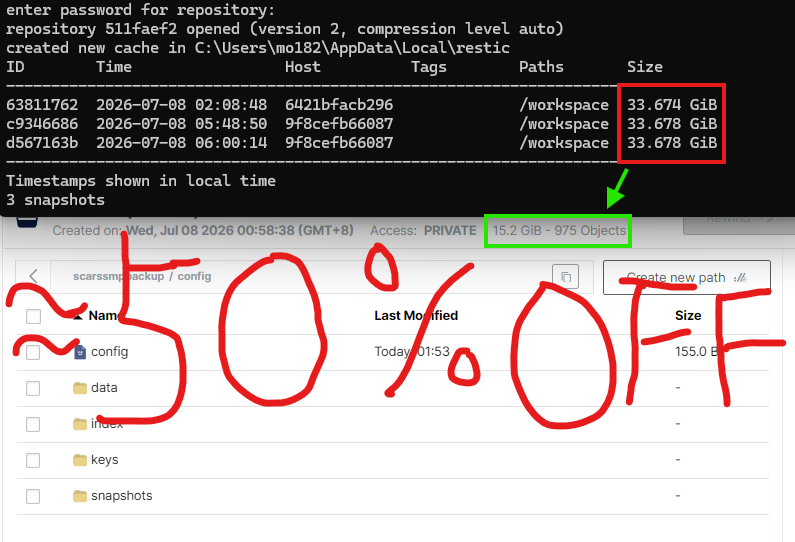
The image below demonstrates the advantages of using Restic for Minecraft backups: each snapshot represents a full backup of that specific point in time, yet the total storage consumed is only about half of the actual data size.
License
This project is released under the GNU General Public License v3.0 (GPL-3.0).
Introduction source: README_EN.md