MCDR2Restic


An MCDReforged plugin that runs restic deduplicated incremental backups for Minecraft servers, with scheduling, snapshot restore, and multi-channel notifications.
中文 | English
Features
- Scheduled backups via 6-field cron or fixed intervals; a running backup can be interrupted
- Skips scheduled backups when nobody is playing, using join/left events plus a
listonline check - Player-count gate: with a slow remote repository, backups are automatically postponed or interrupted at peak hours so a long
save-offwindow cannot exhaust server memory - Forced backup scheduling that ignores player activity (disabled by default)
- Automatic restic download (Linux/Windows amd64) with outdated copies upgraded automatically, using built-in official, self-hosted mirror and proxy sources
- Snapshot restore: full snapshot, single file, or folder — including restore into a chosen directory
- Automatic pre-restore safety snapshot with rollback on failure
- Repository maintenance:
forget/pruneand friends, scheduled independently - Notifications via OneBot QQ, Discord, and a custom webhook, all can be enabled at once
- Bilingual (Chinese/English) messages and config comments, following the MCDR language
- Configuration safety check: the restic repository must not sit inside a backup source
Demo
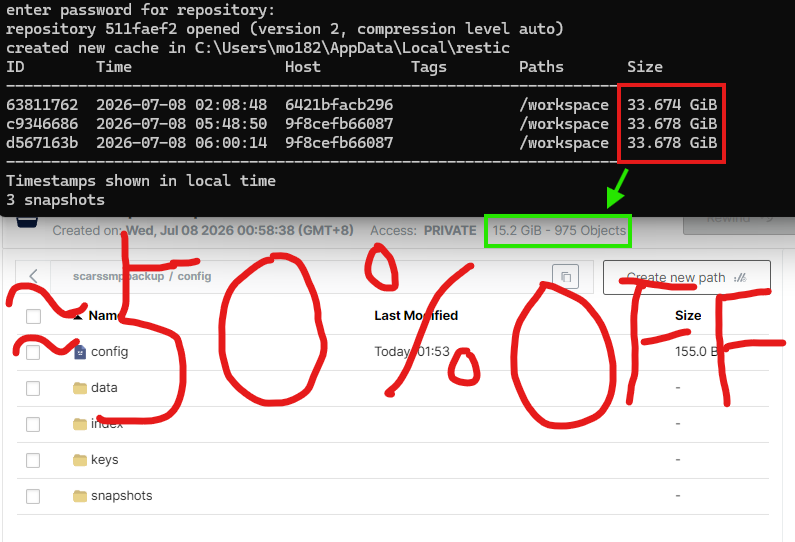
Every snapshot is a complete backup of its point in time while only consuming incremental storage:
Requirements
- MCDReforged >= 2.12.0
- Python dependencies are installed by MCDR from
requirements.txt(PyYAML,websocket-client)
Familiarize yourself with basic restic concepts before using this plugin (restic manual). The default configuration works out of the box, but advanced use cases such as remote repositories and retention policies still require restic knowledge.
Installation
The plugin is published in the MCDR plugin repository — one command installs it:
!!MCDR plugin install mcdr2restic
Updating later is also a one-liner:
!!MCDR plugin install -U mcdr2restic
Manual installation: grab MCDR2Restic.mcdr from the latest Release, drop it into MCDR's plugins/ directory, and run !!MCDR reload all. On first load a sample configuration tailored to your system is generated at config/mcdr2restic/config.yml — the defaults just work:
- restic is downloaded, kept up to date and the local repository initialized automatically
./server/worldis backed up by default (all three world directories are added when detected)- On Windows the sample uses
.\config\mcdr2restic\restic.exe-style backslash paths and excludessession.lock
Adjust the configuration as needed, then run !!m2r reload.
Only the world directories are backed up by default. For full restore capability, consider backing up the entire
./serverdirectory or even the whole MCDR root, protecting server files beyond the save data.The example password
123456only lowers the entry barrier — change it for production use.The OneBot dependency is named
websocket-client(imported aswebsocket). If a conflicting package with the same name is installed, the plugin reports the problem. If dependency installation fails behind mainland-China networks, configure a PyPI mirror or proxy for the Python environment MCDR uses.
Commands
The default root is !!restic with !!m2r as an alias (fully equivalent); shorter !!m2r examples are used below, and typing the bare root shows the status.
| Command | Description |
|---|---|
!!m2r status [p <page>] | Show status and the snapshot list |
!!m2r backup | Trigger an immediate backup |
!!m2r start / stop | Enable / disable scheduled backups |
!!m2r cancel | Cancel the currently running task without touching the scheduling switch |
!!m2r init | Initialize the repository manually |
!!m2r unlock | Unlock the repository |
!!m2r maintenance | Run repository maintenance manually |
| `!!m2r exec [ | filter stages]` |
!!m2r restore <snapshot> | Queue a full-snapshot restore |
!!m2r restore <snapshot> file <path> | Queue a single-file restore |
!!m2r restore <snapshot> folder <path> | Queue a folder restore |
!!m2r restore <snapshot> to <dir> | Queue a full-snapshot restore into a chosen directory (no server stop) |
!!m2r restore <snapshot> to <dir> file <path> | Queue a single-file restore into a chosen directory |
!!m2r restore <snapshot> to <dir> folder <path> | Queue a folder restore into a chosen directory |
!!m2r restore list | Show queued restore tasks |
!!m2r restore apply | Apply the restore task queue |
!!m2r restore apply --skip-safety | Apply the restore task queue without a safety snapshot |
| `!!m2r unrestore | all` |
!!m2r notify-test | Send a test message to all enabled notification channels |
!!m2r reload | Reload configuration |
The default command permission level is 3 and can be changed in the configuration.
Queued tasks are not executed immediately. When running restore apply:
- Restore into the server working directory (default): a safety snapshot is created first, then Minecraft is stopped via MCDR, files are restored, and the server starts again; failures roll back to the safety snapshot automatically. Adding
--skip-safetyskips the safety snapshot — rollback is then impossible, so use it carefully. - Restore into a chosen directory (when every task carries
to): the server keeps running while the restore executes; target directories inside the restic repository or backup sources are rejected.
Documentation
Full configuration references, scheduling details, and FAQs live in the online docs (Chinese; sources under docs/):
Development & Build
# Run tests (coverage must stay at or above 65%)
python -m coverage run --branch --source=mcdr2restic,tools -m unittest discover -s tests -p "test_*.py"
python -m coverage report --fail-under=65

# Build the .mcdr archive
python tools/pack_plugin.py --output-dir dist

# Preview the docs site locally (Material for MkDocs)
pip install -r requirements-docs.txt
mkdocs serve
After editing lang/zh_cn.json or en_us.json, run python tools/sync_language_resources.py to regenerate zh_tw and keep both language file copies in sync; CI verifies that both lang/ copies match and fails when they do not.
GitHub Actions runs the tests and stores build artifacts on every push; pushing a tag like v0.6.0 builds the archive and publishes a release automatically.
Contributing
Issues and pull requests are welcome.
License
This project is released under the GPL-3.0 license.
Introduction source: README_EN.md